


Personal CRM tools bring customer relationship management to individuals. First, they keep all customer data in one CRM system. As a result, you get clean contact management, a timeline of customer interactions, and simple reminders. Together, these features streamline customer data and reduce data entry.
Moreover, modern CRM software helps you automate administrative tasks. In seconds, you can log emails, notes, and meetings. At the same time, you can track a simple sales pipeline and the customer journey. In addition, many CRM solutions are cloud-based with a clear user interface, reporting and analytics, and AI CRM suggestions. Ultimately, they help you manage relationships, improve customer engagement, and support customer retention.
Better yet, costs and setup can stay low. For starters, many platforms offer a free plan or free CRM software for small businesses and solos. Specifically, look for fast capture, search, tags, and integrations with calendar and email. Above all, pick the right CRM app to fit your workflow and business objectives. Next, we introduce the best personal CRM tools to unlock your productivity.
What Is a Personal CRM in Customer Relationship Management?
A personal CRM brings customer relationship management to individuals. In essence, it is a lightweight CRM system for your own network. By centralizing information, you keep all customer data and customer information in one place. At a glance, you see contacts, notes, tasks, and next steps. Taken together, a personal CRM consolidates CRM data and customer activity, giving you a complete view of your network.
Moreover, personal CRM focuses on contact management and context. Specifically, it records customer interactions, customer behavior, and the customer’s history. For example, a CRM application can track a customer’s history and previous purchases, allowing you to personalize interactions and provide more relevant recommendations. As a result, it helps you map the customer journey and a simple sales pipeline. Meanwhile, it can streamline processes and automate administrative tasks like reminders and basic data entry.
Beyond that, most personal CRMs are cloud-based CRM tools. Typically, they sync email and calendar. In addition, many offer a clean user interface, reporting and analytics, and a customizable dashboard. On the go, some include AI CRM suggestions and mobile capture. To keep costs down, you can start with a free plan or free CRM software.
At its best, a good personal CRM acts as a unified platform. Additionally, it supports tags, customer segmentation, and quick search. Likewise, it can integrate with CRM technology you already use, such as Microsoft Dynamics, Zoho CRM, or task apps. If needed, it may add collaboration features for a partner or small team.
Ultimately, use personal CRM to manage relationships, improve customer engagement, and support customer retention. It serves not only current and potential customers, but also mentors and partners. For small businesses, freelancers, and creators, it is the right CRM to align with your business objectives and accelerate growth.
Types of CRM Solutions
Customer relationship management solutions come in several forms, each designed to support different aspects of managing customer relationships and business processes. Understanding the main types of CRM solutions helps you choose the right fit for your business objectives and the needs of your current and potential customers.
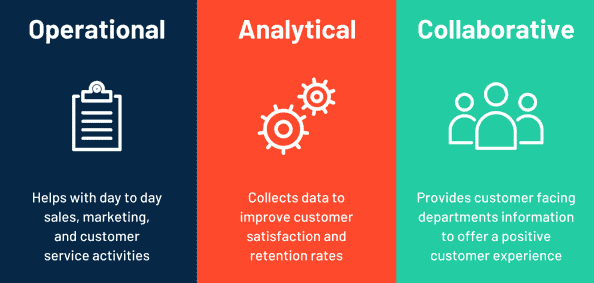
Operational CRM systems focus on streamlining customer data and automating routine tasks across sales, marketing, and customer service. These CRM solutions help manage the entire customer lifecycle, from lead management to ongoing support, making it easier to track customer interactions and nurture potential customers through the sales pipeline.
Analytical CRM platforms are built to turn customer data into actionable insights. They help you understand customer behavior, segment your audience, and optimize marketing campaigns. By analyzing trends and patterns, these CRM systems support smarter decision-making and improve customer satisfaction.
Collaborative CRM tools are designed to enhance communication and information sharing across teams. They unify customer information and company data, making it easy for sales teams, marketing teams, and support staff to work together. This type of CRM solution ensures that everyone has access to the latest customer interactions and can deliver a consistent customer experience.
Choosing the right type of CRM system depends on your business goals, the complexity of your customer relationships, and the specific needs of your current and potential customers. Whether you need to automate processes, gain deeper insights, or improve team collaboration, there is a CRM solution tailored to help you accelerate growth and manage relationships more effectively.
Why Personal CRM Tools Matter Now
Personal CRM tools bring customer relationship management to individuals. To begin with, they put all your customer data in one CRM system. As a result, they help with contact management, notes, and next steps. Together, these capabilities streamline customer data and reduce data entry.
Meanwhile, modern CRM software reduces manual work. Specifically, it can streamline customer data and cut data entry. In addition, it can automate administrative tasks like reminders and follow-ups.
Crucially, a personal CRM shows context. At a glance, you see customer interactions, the customer journey, and a simple sales pipeline. Therefore, you track outcomes and spot gaps fast.
On top of that, many options are cloud-based CRM. They typically offer a clean user interface, reporting and analytics, and mobile access. Some even add AI CRM for actionable insights.
Importantly, good CRM solutions fit your business objectives. Consequently, they improve customer engagement and customer retention. When needed, they also support collaboration features when you work with a partner. In practice, these tools also support sales management and marketing efforts as part of a broader CRM strategy, helping to optimize processes and maximize ROI.
Better yet, costs can be low. For starters, many tools have a free plan or free CRM tier for small businesses. From there, start simple, then grow your CRM platform as needs expand.
Ultimately, choose the right CRM and you will save time. In turn, you will organize customer information and company data. This means you will make better decisions, faster. Overall, Personal CRM tools boost employee productivity by automating routine tasks, allowing sales reps and the sales team to work more efficiently and focus on higher-value activities.
Multitypes of Personal CRM Tools
1) Email-Embedded Personal CRM
Works inside your inbox. It feels like customer relationship management software in Gmail or Outlook. It logs customer interactions and customer activity from threads. It reduces data entry and helps streamlining customer data. Good for solos who live in email. Look for a clean user interface, templates, and quick contact management.
2) Calendar- and Task-Driven CRM
Built around schedules and follow-ups. It tracks the customer journey as meetings and notes. You see next steps and a simple sales pipeline. It can automate administrative tasks like reminders. Useful for consultants and coaches. It supports recurring nudges and lightweight crm features.
3) Notes/Database-Centric CRM
This is a flexible crm system made from pages and tables. You design fields, views, and tags. It stores customer data, files, and the customer’s history. It fits custom business processes and customer segmentation. It pairs well with document sharing apps and web clippers. It needs time to model, but gives control and a customizable dashboard.
4) Lightweight Pipeline CRMs for Individuals
Focus on deals and sales pipelines. You move cards through stages in a kanban. You track lead management, notes, and outcomes. It is simple crm software for a solo sales process. Many tools offer a free plan or free CRM software for small businesses. Check reporting and analytics and mobile capture.
5) Social Graph and Enrichment CRMs
Pull data from LinkedIn and other sources. They enrich customer information and company data. They suggest intros and touchpoints. They support tags, signals, and customer behavior cues. They help you manage relationships and improve customer engagement with minimal typing.
6) Mobile-First Contact Managers
Designed as a fast crm app on your phone. One-tap notes. Voice to text. Business card scan. Great for events and travel. It can automate routine tasks like adding tags and next-touch dates. Export crm data to other crm solutions when you grow.
7) AI-Powered Personal CRM
Adds AI CRM suggestions and summaries. It drafts follow-ups. It proposes next actions. It can automate processes and reduce administrative tasks. It surfaces actionable insights across the entire customer lifecycle. Check privacy and explainability before adopting.
8) Collaborative Personal CRM for Duos or Small Teams
Built for a founder pair or a tiny sales team. It adds sharing, permissions, and collaboration features. It connects to marketing campaigns and online chat. It can sync with a larger CRM platform later. It keeps crm costs low while you grow.
9) Integrations-Focused CRMs
These tools connect to Microsoft Dynamics, Zoho CRM, Google Workspace, and task apps. They are a unified platform for email, calendar, web forms, and customer interaction logs. They help streamline processes and keep the crm strategy aligned with business objectives.
10) Event and Network Capture Tools
Optimized for networking and potential customers. They scan cards, create contacts, and schedule follow-ups. They export a png file of a QR, or push to your main CRM. They are great companions to any of the personal CRM tools above.
Popular Personal CRM Tools in the Market
1.HubSpot CRM
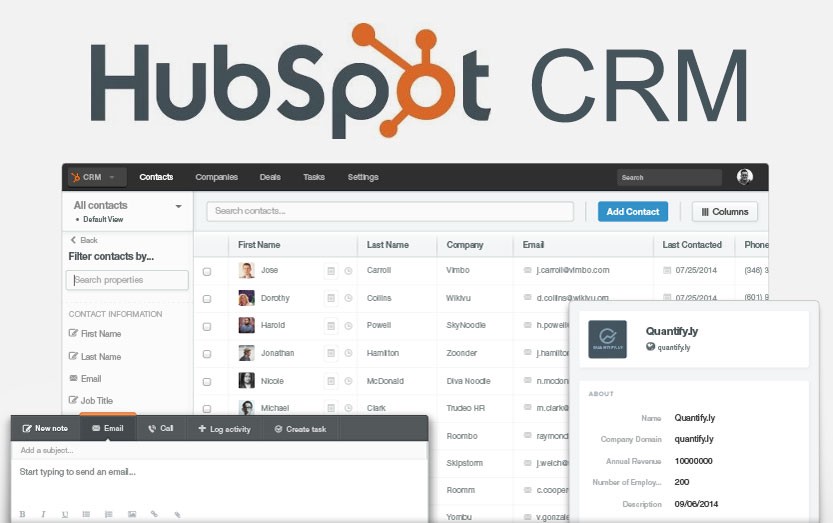
HubSpot CRM is a cloud-based customer relationship management software that works well for individuals and small teams. It centralizes customer data in one CRM system. It helps you track contacts, notes, and customer interactions with a clean user interface. It is one of the most popular personal CRM tools because the core free plan covers essentials.
Key Features
- Contact management: Store customer information, timelines, and the customer’s history.
- Sales pipeline: Visual boards to track deals and the sales process from lead to close.
- Email & calendar sync: Log emails automatically and reduce data entry; use templates inside the CRM.
- Marketing basics: Forms, simple marketing campaigns, and landing pages to capture potential customers.
- Reporting and analytics: Dashboards for activities, deals, and customer engagement.
- Automation: Workflows to automate administrative tasks and follow-ups (paid tiers), easing routine work.
- AI CRM helpers**:** suggestions for copy, summaries, and next actions (availability varies by tier).
- Integrations: Connects with common tools (email, calendars, docs) to streamline processes in a unified CRM platform.
Advantages
- Best free CRM value: The free CRM software tier is generous for solos and small businesses, keeping CRM costs low.
- Easy to start: Fast setup, simple crm app experience, and clear crm features for a practical crm strategy.
- End-to-end view: See the customer journey and manage customer relationships across the entire customer lifecycle.
- Productivity boost: Pipelines, templates, and light automation automate processes and boost employee productivity.
- Scalable: Start as a personal CRM and grow into fuller crm solutions as needs expand, without switching systems.
If you want a no-risk start with a recognizable CRM solution, HubSpot CRM’s free plan is a strong first step toward organized contacts, a visible sales pipeline, and actionable insights.
2.Zoho CRM

Zoho CRM is a cloud based CRM that suits individuals and small businesses. It is customer relationship management software that centralizes customer data in one CRM system. You can manage contacts, notes, and customer interactions with a clean user interface. It is a practical crm solution if you want to streamline processes and reduce data entry.
Key Features
- Contact management and timelines: see customer information, tasks, and the customer’s history.
- Sales pipeline and lead management: track the sales process from lead to close with simple boards.
- Automation: workflows to automate administrative tasks, route leads, and automate routine tasks.
- AI CRM (Zia): surface actionable insights, next-step suggestions, and detect customer behavior signals.
- Reporting and analytics: dashboards and a customizable dashboard for activity, deals, and customer engagement.
- Marketing tools: forms, campaigns, and online chat to capture potential customers.
- Integrations: connects with email, calendar, document sharing apps, and other crm tools to fit your crm strategy.
Advantages
- Low CRM costs with a free plan / free CRM software tier; easy to start and scale.
- Strong automation to streamline customer data, automate processes, and boost employee productivity.
- End-to-end view of the customer journey and entire customer lifecycle for better customer relationships and customer retention.
- Flexible for different business processes and customer segmentation, so you can align with your business objectives.
- A solid all-round CRM platform for personal CRM needs, with room to grow into fuller crm systems as requirements expand.
3.Streak (Gmail CRM)

Streak is a CRM app that lives inside Gmail. It brings customer relationship management into your inbox. You track emails, notes, and customer interactions without leaving your thread. It is useful for solos and small businesses that want a light crm solution with low crm costs.
Key Features
- Contact management in Gmail: view customer data, tasks, and the customer’s history next to each email.
- Sales pipeline boards: simple stages for the sales process and quick filters for deals.
- Email automation: templates, merge mail, and scheduled follow-ups to automate administrative tasks and reduce data entry.
- Context in one place: files, notes, and links attach to a box, helping with customer engagement and clean crm data.
- Reporting and analytics: basic dashboards for activity and outcomes.
- Integrations: connects to calendars, forms, and document sharing apps; exports to other crm systems if you grow.
Advantages
- Inbox-native workflow: no new tool to learn; the user interface matches Gmail, which helps boost employee productivity.
- Fast capture: turn any thread into a lead in one click; great for streamlining customer data.
- Low barrier to start: simple setup and a starter free plan / free CRM tier for testing.
- Personal CRM fit: ideal for individuals who live in email and need light crm features.
- Scales gradually: add pipelines, templates, and basic automation as your crm strategy matures.
4.Pipedrive

Pipedrive is pipeline-first customer relationship management software. It helps individuals and small businesses track deals with a visual sales pipeline. It centralizes customer data in one CRM system and reduces manual data entry. It is simple, fast, and focused on outcomes. It fits personal CRM needs and small sales teams.
Key Features
- Pipeline view: drag-and-drop stages for the sales process and quick filters.
- Contact management: store customer information, notes, and the customer’s history.
- Automation: workflows to automate administrative tasks, reminders, and follow-ups.
- Email & activity tracking: log customer interactions and schedule calls or meetings.
- Reporting and analytics: see won rates, cycle time, and team activity.
- Integrations: connect calendars, forms, and apps to streamline processes.
Advantages
- Focused UX: the clean user interface keeps reps on the next action and helps boost employee productivity.
- Fast adoption: minimal setup; good for solos who want a practical crm solution.
- Low CRM costs: tiered pricing with essential crm features; try first, then scale.
- Better visibility: clear pipelines improve customer engagement and follow-through.
- Scalable workflow: start as a lightweight crm app; add automation and reports as your crm strategy grows.
5.Copper (for Google Workspace)

Copper is a cloud based CRM built for Gmail and Google Calendar. It brings customer relationship management into your inbox. It centralizes customer data in a simple CRM system and reduces manual data entry. It suits individuals and small businesses that live in Google Workspace and want a focused crm solution.
Key Features
- Contact management in Gmail: see customer information, notes, and the customer’s history beside each thread.
- Sales pipeline: visual boards to track deals and the sales process end to end.
- Auto capture: logs customer interactions from Gmail and Calendar to help with streamlining customer data.
- Reporting and analytics: activity, pipeline, and performance views for quick insights.
- Integrations: tight Google Workspace fit (Gmail, Calendar, Drive) plus common document sharing apps and forms.
- Workflow tools: reminders and basics to automate administrative tasks and keep next steps clear.
Advantages
- Inbox-native user interface: familiar Gmail experience that can boost employee productivity.
- Low friction: fast setup, minimal clicks, less context switching; good for personal CRM routines.
- Google-first alignment: a natural crm platform for teams using Google Workspace; easy to match business processes.
- Better visibility: clean pipelines improve follow-through and customer engagement across the customer journey.
- Scalable: starts simple for solo work, then supports sales teams and more structured crm strategy as you grow.
6.Nimble
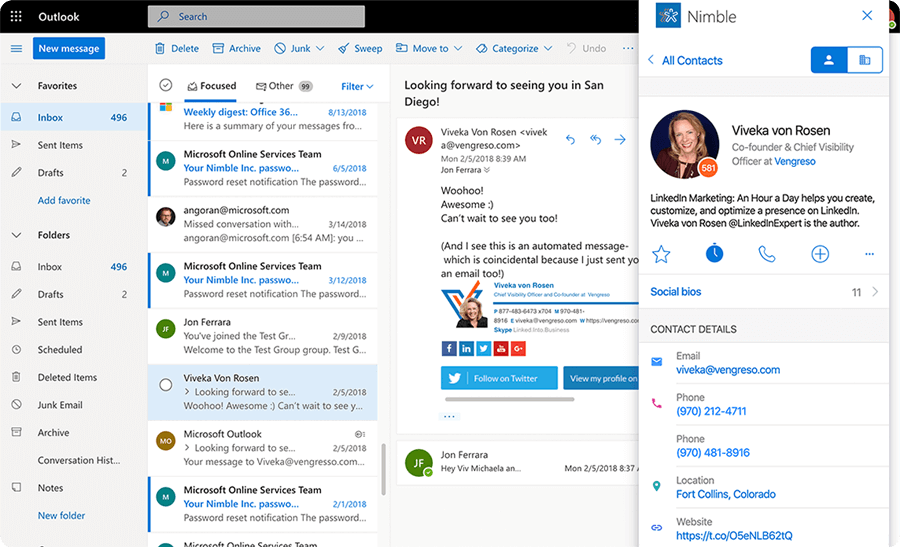
Nimble is a relationship-centric CRM app for individuals and small teams. It blends customer relationship management with social enrichment. It pulls customer data from email, calendar, and social profiles into one lightweight CRM system. It helps you see context, history, and next steps in one place. It is a practical crm solution for networking and warm outreach.
Key Features
- Unified contact management: centralize customer information, notes, and customer interactions; reduce data entry and aid streamlining customer data.
- Social enrichment: auto-surface bios, company details, and signals about customer behavior to improve customer engagement.
- Prospector & segmentation: tags, lists, and simple customer segmentation for targeted outreach.
- Sales pipeline (lightweight): track deals and activities; keep a clear view of the sales process.
- Inbox & calendar sync: connect email and meetings to maintain clean crm data and the customer journey.
- Reporting and analytics: activity and pipeline snapshots for quick insight.
- Automation helpers: templates and reminders to automate administrative tasks and follow-ups.
- Integrations: ties into common tools to streamline processes; works as a cloud based CRM.
Advantages
- Relationship first: great for managing warm introductions and ongoing customer relationships and personal relationships.
- Context at a glance: social and company enrichment provides actionable insights without extra clicks.
- Low friction: simple user interface and fast capture; good fit for small business owners and solos using personal CRM tools.
- Productivity boost: reminders and templates automate processes, saving time and improving follow-through.
- Scalable basics: start lean for outreach, then add lists, tags, and a light sales pipeline as your crm strategy grows.
7.Cloze

Cloze is a personal, AI-assisted customer relationship management app that organizes your emails, meetings, notes, and social signals into one lightweight CRM system. It auto-captures customer interactions and surfaces context so you can focus on follow-ups, not data entry. It suits individuals and small businesses that want a smart, low-friction crm solution to manage ongoing customer relationships and personal relationships.
Key Features
- Automatic capture & timelines: pulls emails, calendar events, calls, and notes into a unified view to aid streamlining customer data and keep clean crm data.
- AI assistance: nudges for who to contact next, drafted follow-ups, and summaries that reduce administrative tasks and automate routine tasks.
- Contact management: profiles with customer information, tags, and the customer’s history; simple customer segmentation for targeted outreach.
- Lightweight pipeline: track opportunities and activities across the sales process without heavy setup.
- Reporting and analytics: snapshots of activity and outcomes for quick insight and better crm strategy decisions.
- Integrations: email/calendar sync and connections to common tools to streamline processes in a cloud based CRM style.
Advantages
- Less manual work: auto-logging and AI prompts automate administrative tasks, helping you boost employee productivity and stay consistent.
- Stronger context: enriched views of customer behavior and interactions improve timing and customer engagement.
- Personal CRM fit: ideal for solos who live in their inbox yet need organized contact management and a simple sales pipeline.
- Low lift, clear UI: approachable user interface and fast setup keep crm costs and complexity down while supporting growth in your crm strategy.
8.Capsule CRM
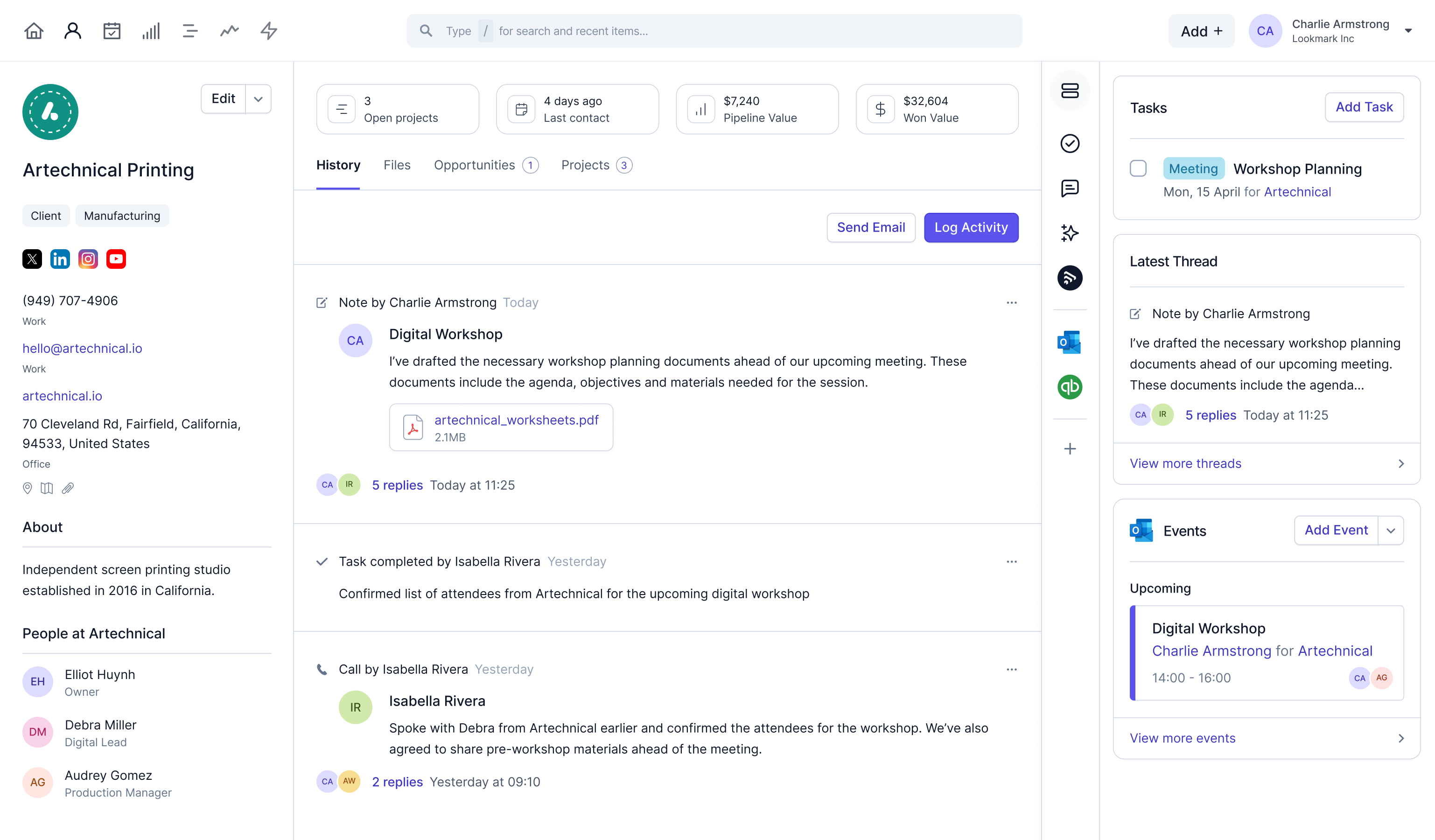
Capsule CRM is a clean, lightweight customer relationship management software for individuals and small businesses. It centralizes customer data in one CRM system and keeps customer interactions organized. It fits personal CRM use cases where you want simple contact management, tasks, and a visible sales pipeline without heavy setup or high CRM costs.
Key Features
- Contact management: store customer information, notes, and the customer’s history in a tidy timeline.
- Sales pipeline: visual stages for your sales process with activities and reminders.
- Tasks & follow-ups: reduce data entry and automate administrative tasks with basic workflows and alerts.
- Reporting and analytics: quick views of deals, activities, and outcomes to guide your crm strategy.
- Integrations: connects to email, calendars, and document sharing apps to streamline processes in a cloud based CRM style.
- Customization: tags, fields, and lists for light customer segmentation and cleaner crm data.
Advantages
- Simple, friendly UI: an approachable user interface that’s easy to learn and helps boost employee productivity.
- Fast to value: minimal setup for solos; good fit among personal crm tools when you need essentials first.
- Clear focus: pipelines and reminders improve follow-through and customer engagement.
- Cost-effective: tiered pricing with a starter option; control CRM costs while adding the crm features you need over time.
- Scales with you: start as a lightweight crm app and expand workflows, reports, and integrations as your business objectives grow.
How to Choose the Right Personal CRM Tool for You
Start with your workflow. List daily actions. Do you live in email, calendar, or notes? Pick personal CRM tools that match how you already work. This keeps change small and adoption fast.
Define your goals. Write 3–5 business objectives. Examples: keep a clean sales pipeline, improve follow-ups, or centralize customer data. Your goals will guide your CRM strategy and tool choice.
Check must-have CRM features. You likely need quick contact management, a unified timeline of customer interactions, reminders, and search. Many modern CRM systems also reduce data entry and automate administrative tasks like follow-ups.
Match the tool to your channel. Email-first? Choose an inbox crm app. Meeting-first? Choose a calendar-driven crm solution. Deal-first? Choose pipeline-centric crm software. Notes-first? Consider a database template.
Look at integrations. Sync email and calendar. Export and import crm data. Connect forms, document sharing apps, and task tools. If needed, check connectors to Microsoft Dynamics, Zoho CRM, or marketing tools. Good integrations streamline processes.
Evaluate usability. Test the user interface on desktop and mobile. Create a contact. Log a meeting. Set a reminder. If it feels slow, you will not use it daily.
Start small on cost. Try a free plan or free CRM software. Confirm limits for contacts, automation, and dashboards. Keep crm costs low until the system proves value.
Consider insights. Do you need analytics now? Many tools offer reporting and analytics and basic AI CRM suggestions. These can surface actionable insights and the next best touch.
Plan for data control. Ensure easy export of customer information. Add tags for customer segmentation. Keep the customer’s history clean. Clear data helps customer engagement and customer retention.
Test with real cases. Import 50 contacts. Build one sales process. Run two weeks of follow-ups. If you feel less stress and better clarity, you found the right CRM. If not, switch tools and repeat.
Document your routine. Set a weekly review. Clear your inbox, update the pipeline, and schedule next steps. A consistent routine will boost employee productivity (even if you are a team of one).
Finally, think scale. Can the tool grow from personal CRM to light team use? Look for simple sharing, permissions, and basic collaboration features. You will be ready when your network and opportunities expand.
Tips for Maximizing the Use of Your Personal CRM Tool
Set a daily routine. Open your CRM app every morning. Review tasks, customer interactions, and the next step. Small, steady updates beat big clean-ups.
Keep customer data clean. Use consistent tags and fields. Remove duplicates. This is streamlining customer data. Good data improves search and reporting and analytics.
Capture context fast. Log notes right after a call or meeting. Save the customer’s history in your crm system. Add outcomes and a due date for the next touch.
Use templates. Create short email and message templates. This reduces data entry and helps automate administrative tasks. It also keeps tone consistent.
Run a simple sales pipeline. Define clear stages of your sales process. Move items every time you work them. Stale deals clog your view and hide potential customers.
Leverage integrations. Connect calendar, email, and document sharing apps. Let the tool auto-log events to your crm data. This will streamline processes and cut clicks.
Try light automation. Use workflows to automate routine tasks like reminders or handoffs. Start small. Expand when it works. You can later automate processes for more steps.
Segment smartly. Create tags for customer segmentation (e.g., priority, industry, region). Send focused follow-ups. Better segments raise customer engagement and replies.
Use dashboards. Check a customizable dashboard weekly. Look at new leads, win rate, and aging deals. Turn metrics into actions for your crm strategy.
Adopt mobile habits. Add contacts from events on your phone. Snap a card and attach it. Quick capture keeps business processes moving.
Document playbooks. Write one-page guides for “first outreach,” “post-meeting recap,” and “renewal check-in.” Playbooks help sales teams and solos boost employee productivity.
Protect privacy. Store only needed customer information. Set permissions if you share data. Clean access keeps trust and customer satisfaction high.
Use AI wisely. If your customer relationship management software has AI CRM, try summaries and next-best-action tips. Treat them as suggestions, not rules.
Control costs. Start with a free plan or free CRM software. Upgrade when key features or limits block results. Keep crm costs aligned with business objectives.
Review weekly. Do a pipeline sweep. Clear overdue tasks. Schedule next steps. A regular cadence turns personal CRM tools into real outcomes.

Conclusion
Personal CRM tools turn scattered notes into organized action. In practice, they bring customer relationship management to everyday work and life. With everything centralized, your customer data lives in one CRM system. At a glance, you see contacts, context, and next steps.
From there, choose the right CRM solution for your workflow and business objectives. Email-first? Try an inbox CRM app. Meeting-first? Use calendar-driven tools. Deal-first? Go pipeline-centric. Ultimately, the goal is clarity, consistency, and momentum. So, embrace a simple, cloud-based platform, build habits, and let automation handle the routine. With the right setup, you will boost employee productivity, manage relationships with confidence, and accelerate growth—both at work and in your personal relationships.
FAQ
Q1. What is the best CRM for a single person?
There’s no single “best,” but great solo-friendly picks are: Streak (Gmail-native) if you live in email, HubSpot CRM (free tier) for an all-round starter, Pipedrive/Capsule for pipeline clarity, and Cloze if you want AI-assisted follow-ups.
Q2. Does Google have a free CRM?
No official Google CRM. You can hack it with Google Sheets/Contacts or use Workspace-integrated options like Copper or Streak; many third-party CRMs offer free plans.
Q3. What is CRM in simple words?
CRM is a way to keep track of people you work with, what you talked about, and what to do next—so nothing slips through the cracks.
Q4. What is a CRM tool?
It’s software that stores contacts, logs emails/meetings, reminds you to follow up, tracks deals/tasks, and gives simple reports to help you manage relationships.

![What is NFC in Phones? How Does it Work? How to Use [2026 Ultimate Guide]](https://card.biz/wp-content/uploads/2025/12/image-125-420x280.png)
