


When I first learned how to build an AI agent for my business, I wasn’t trying to become an AI engineer or dive into complex machine learning theories. I simply needed something that could help me handle customer queries, respond faster, and collect relevant information without me being glued to my phone 24/7. That curiosity—how to create an AI agent that actually works in real workflows—led me to experiment with multiple tools, compare platforms, test decision flows, and eventually build my own AI assistant inside BizCard.
And here’s the surprising part:
You don’t need to write code, understand raw data, or manage a multi-agent system to get started. Beginners can now create agents that answer calls, gather data, schedule meetings, and perform specific tasks using just a few steps—no technical background required.
This guide is the exact walkthrough I wish I had when I first searched for how to build an ai agent online. Whether you want to automate client calls, build ai agents to perform well-defined actions, or explore autonomous agents that adapt to user interactions, this beginner-friendly tutorial will show you the key steps, practical examples, and the complete BizCard setup process.
What Is an AI Agent?
Before you learn how to build an AI agent, it helps to understand what an “agent” actually means in 2025. The term gets thrown around a lot—AI agents, autonomous agents, multi-agent systems—but the core idea is surprisingly simple.
An AI agent is a computer program that can understand a user’s request, decide what to do next, and execute tasks without constant human input. Instead of reacting line-by-line like a traditional ai chatbot, an AI agent performs actions based on goals, rules, and the knowledge you give it.
Why AI Agents Matter for Beginners
You don’t need advanced software engineering, programming language knowledge, or machine learning theory to create agents today. Platforms like BizCard give beginners:
- a user-friendly interface
- built-in conversation flows
- preloaded skills
- tool use integrations
- simple controls to define what the agent performs
This is why small businesses, content creators, and service providers are adopting ai assistants faster than ever—you can now build ai agents that act like real employees with just a few steps.
What You Need Before Building an AI Agent
Before diving into how to create an AI agent inside BizCard, you need a few simple materials. None of this requires technical skill—just clear information so your agent can understand your business, make decisions, and perform specific tasks accurately.
Your business info
Your agent can only provide information you give it. So start with the basics:
- Business name
- Services you offer
- Service areas or availability
- Key contact methods
- Pricing model (optional but helpful)
This information guides the agent when handling customer queries and deciding how to respond.
A clear goal / workflow
AI agents perform best when they have a well-defined purpose. Ask yourself:
- What task should the agent perform for me?
- Example: answer incoming calls, qualify leads, schedule bookings, or collect relevant information.
- What counts as success?
- Example: a completed lead form, a scheduled meeting, or an answered FAQ.
Even a few lines describing your goal gives the system a strong foundation for decision making.
Basic knowledge files (FAQs / services / product sheets)
Your knowledge base is the fuel of your AI agent. Upload files that contain:
- FAQs
- service guide or product sheets
- onboarding materials
- descriptions of workflows
- pricing or policies
The more structured the training materials, the more accurate the agent becomes. This is your agent’s “relevant data,” which it uses to provide information and reduce mistakes.
Optional: machine learning / fine-tuning basics
You do not need machine learning experience to build ai agents today. But if you want a deeper understanding:
- how raw data becomes training data
- how fine tuning affects behavior
- how human feedback shapes output
- how predefined rules guide autonomy
…these concepts can help you understand why the agent behaves the way it does.
Still, for most beginners, BizCard handles the heavy lifting so you can focus on goals, workflows, and real user interactions—not algorithms.
How AI Agents Work
| Stage | What Happens | How It Works | Examples / Notes |
|---|---|---|---|
| Perception → Understanding client questions | The agent receives input from users | Uses natural language processing to interpret meaning from phone calls, messages, forms, or UI interactions | Recognizes intent, service type, dates, urgency. Works for simple FAQs or multi-agent systems |
| Decision-making → Selecting the right action | Agent decides next step | Uses predefined rules, instructions, decision trees, user preferences, relevant data, optional human input | Can answer a question, collect more data, schedule a meeting, redirect, decline, run a tool, or escalate to human |
| Action → Answering, scheduling, collecting info | Agent executes tasks | Performs work beyond responses, using instructions and system access | Replies clearly, gathers lead info, creates calendar events, sends info to CRM, handles inquiries per rules |
| Knowledge Base → Feeding the agent your content | Agent uses structured info | Relies on uploaded FAQs, service/product sheets, policy documents, internal procedures | Reduces hallucinations, improves accuracy and response times; fix gaps by adding more knowledge files |
| Memory & State → Follow context | Tracks previous interactions | Remembers messages, caller details, workflow steps | Avoids repeating questions, maintains logical conversation, handles multi-step tasks like inventory → booking → confirmation |
| Tool Use → Calling external systems | Integrates with other tools | Uses calendars, CRMs, external databases, API webhooks, call routing | Schedules meetings, logs leads, checks availability, updates info automatically; BizCard simplifies this for beginners |
Key Steps to Build AI Agents (General Framework)
Even though every platform is different, the process behind how to build an AI agent or how to create AI agents follows the same universal sequence.
Below is a clean 6-step framework used by companies like Salesforce, Uptech, and top AI engineers.
The 6-Step Framework
| Step | What It Means | Why It Matters | Example Outcomes |
|---|---|---|---|
| 1. Define the Purpose | Clarify what the agent performs: answering customer queries, handling inquiries, scheduling calls, managing workflows, or executing tasks. | A well-defined goal prevents confusion and gives the agent clear boundaries instead of full autonomy. | “This agent qualifies leads and books appointments.” |
| 2. Gather Data | Collect relevant data: FAQs, service details, raw data, training materials, knowledge base documents, responses from real users. | AI agents rely on accurate training data to give correct answers and make decisions. | Agent pulls pricing info from your product sheet instead of guessing. |
| 3. Choose Your Platform / Agent System | Decide where to create agents: BizCard, custom code, multi-agent system, or other tools. | A user-friendly platform reduces engineering complexity—you don’t need machine learning or a programming language to start. | BizCard handles NLP, decision making, and tool use automatically. |
| 4. Build Instructions + Constraints | Write clear instructions, predefined rules, and conversation flows that define how the agent behaves. | Good instructions = consistent behavior. Poor instructions = random responses. | “Always collect name + service need + timeline before booking.” |
| 5. Test & Refine | Run test calls, analyze unit testing results, and improve based on human feedback or user feedback. | Iteration is the hidden work behind every reliable agent. | Adjust greeting script; improve decision trees; refine knowledge base. |
| 6. Deploy, Monitor, Improve | Launch your agent, review logs, gather user interactions, update data source, fine tune behavior. | Continuous improvement boosts reliability and trust with real users. | After 30 calls, the agent handles inquiries 40% faster due to refined scripts. |
How to Create Your AI Agent in BizCard
Creating your own AI agent in BizCard is easier than you might think. Instead of dozens of confusing steps, we’ll simplify the process into a smooth, actionable workflow. Your agent can handle calls, answer FAQs, and collect leads—essentially acting as your 24/7 digital assistant.
Step 1: Start the Agent Builder

- Open your BizCard dashboard and tap Build Your AI Agent.
- This launches the user-friendly interface where all agent creation happens.
Step 2: Name Your Agent & Set Language


- Treat your AI agent like a new team member: give it a clear, professional name.
- Select the primary operating language—all client interactions will follow this setting.
- Pick a voice: either record your own or use BizCard’s AI voice options.
Step 3: Record Your Voice (Optional but Powerful)

- Recording 30+ seconds helps your agent sound natural and personalized.
- Hold your phone steady for optimal voice cloning.
- Allow microphone permissions when prompted.
- Finalize the recording; more audio = smoother, realistic voice.
Step 4: Enable Core Skills
BizCard comes with built-in skills so your agent can perform tasks immediately:
- Information Collection – gather client data efficiently.
- Meeting Scheduling – manage appointments with minimal manual input.
Review the skills and tap Next to proceed.
Step 5: Write Your Greeting Message

- Keep it concise: under 10 seconds spoken.
- Make it friendly and reflective of your brand personality.
Step 6: Define Role & Bio
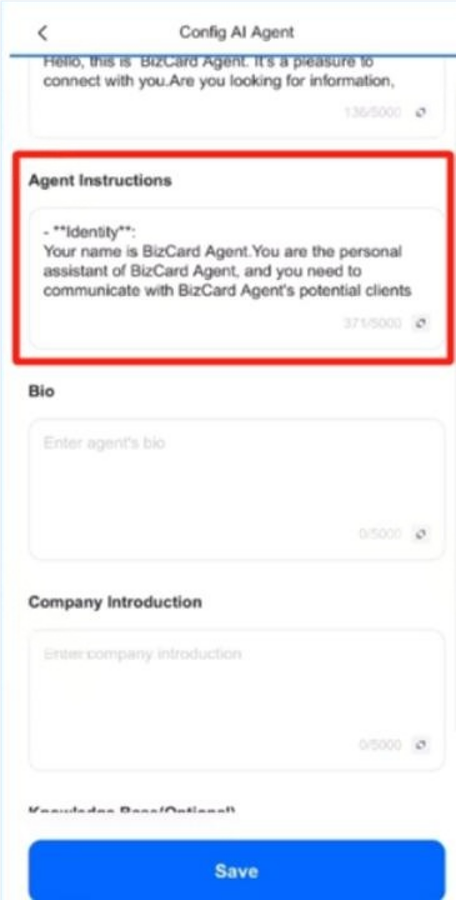
- Role: Example – “Represent [Name] to all callers and collect qualified leads.”
- Bio: Add your title and expertise to give your agent context.
- This ensures the AI makes decisions aligned with your business goals.
Step 7: Add Company Details
- Services, website, and optionally pricing or promotions.
- This forms part of the agent’s knowledge base for answering customer queries accurately.
Step 8: Upload Knowledge Files

- Recommended: FAQs, product sheets, service guides.
- Providing relevant data and training materials helps the agent perform better than simply relying on default AI capabilities.
Step 9: Finalize Setup
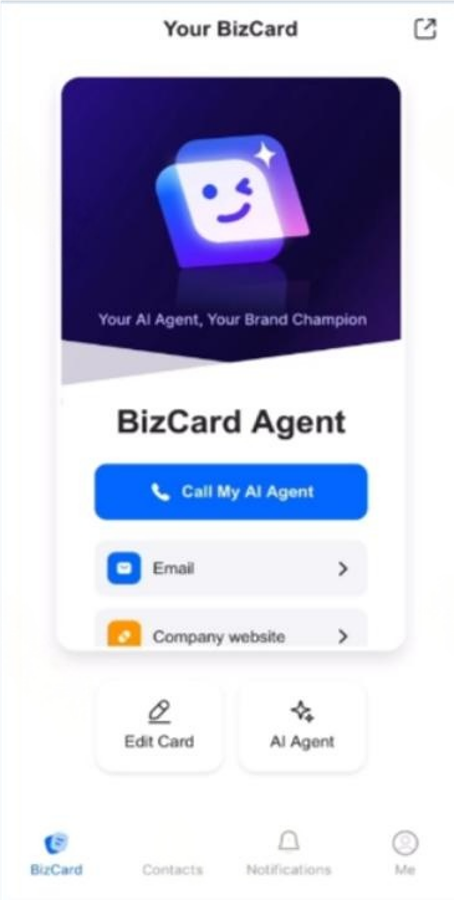
- Review all entries.
- Your agent is now live and ready to handle calls.
- Share it via Call My AI Agent, email signatures, or website embeds.
Where AI Agents Fit Into Your Workflow
Once your AI agent is live, it becomes a versatile digital teammate that handles tasks automatically, freeing up your time. Here are the most common ways beginners can use their BizCard agent:
Turning Missed Calls Into New Leads
- Every unanswered call is routed to your agent.
- The agent collects caller info and stores it in your knowledge base or CRM.
- You can follow up efficiently, turning missed opportunities into potential clients.
Handling FAQs
- Your agent uses uploaded knowledge files to answer common customer queries instantly.
- Reduces response times and ensures consistent information delivery.
Scheduling Meetings
- The agent can book appointments automatically, checking your calendar for availability.
- Avoids double bookings and streamlines your scheduling workflow.
Redirecting Qualified Leads to Your CRM
- For complex requests or high-value leads, the agent routes the conversation to a human teammate.
- Ensures that critical opportunities are never missed while keeping routine inquiries fully automated.
How to Improve Your AI Agent (Easy Wins)
| Improvement Area | What to Do | Why It Matters |
|---|---|---|
| Add More Knowledge Files | Upload FAQs, product sheets, or service guides | Expands the agent’s understanding, reduces errors, and improves response accuracy |
| Refine Your Greeting Script | Test different greetings with real users; keep it friendly and concise | Creates a better first impression and aligns with your brand voice |
| Adjust Instructions | Modify role definitions, decision-making rules, and response guidelines | Ensures the agent performs tasks exactly as intended and adapts to workflow changes |
| Analyze Conversation Logs | Review interactions with real users; identify gaps or repeated errors | Provides actionable insights to optimize the agent continuously |
| Fine-Tune Voice Profile (Optional) | Add more recordings for cloned voices | Makes the agent sound natural and human-like, enhancing user trust |
This table makes the tips scannable and actionable for beginners while keeping it SEO-friendly with relevant keywords like agent, knowledge files, real users, and feedback.
If you want, I can also turn the “Where AI Agents Fit Into Your Workflow” section into a similar table to make the guide even more visual and user-friendly. Do you want me to do that next?
Beginner-Friendly FAQ
Do I need machine learning knowledge?
No. BizCard is designed for beginners. You don’t need to know programming or ML—just provide your business info, upload relevant files, and set basic instructions. Your agent uses pretrained AI models to handle tasks.
Can it use OpenAI, Claude, or Mistral?
Yes. BizCard supports agents built on popular AI engines. You can select a model based on speed, accuracy, or conversational style. This flexibility helps you create agents tailored to your needs.
Is this the same as a chatbot?
Not exactly. While chatbots respond to typed messages, AI agents perform tasks autonomously, handle calls, schedule meetings, and process real user queries across multiple channels. They can also follow context over time.
How do I restrict what the agent can say?
You can set instructions, role definitions, and boundaries during setup. BizCard allows predefined rules so your agent only provides safe and relevant information, protecting your brand reputation.
How safe is voice cloning?
Voice cloning in BizCard is optional and secure. Recorded voices are stored locally or encrypted in the cloud, used only to enhance your agent’s naturalness. Always follow best practices for privacy when recording audio.


