


You want to meet people quickly. Dot business cards help you share your info right away with a tap or scan. This smart tool means you never run out of cards. You also do not make mistakes when typing your info. See how these cards help you meet more people:
| Benefit | Description |
|---|---|
| Instant Information Sharing | NFC technology lets you share contact details fast and correctly. You do not need to type them in. |
| Eco-Friendly | These cards use less paper and help the planet. |
| Easy Updates | You can change your info anytime. You do not need to print new cards. |
| Long-Term Cost Savings | You do not have to pay to print cards again. This saves money over time. |
You look professional and save time. Busy people like you need this.
Setup Dot Business Cards

Activate Your Card
Getting started with dot business cards is quick and easy. First, make sure you have Wi-Fi or mobile data on your phone. Then, follow these steps to activate your card:
- If you already have a dot.Profile:
- Tap your dot business card to your phone.
- Open the link that pops up.
- Select ‘Log In’ and enter your email and password.
- If you do not have a dot.Profile yet:
- Tap your dot business card to your phone.
- Open the link that appears.
- Select ‘Sign Up’.
- Enter your name and create a password.
- Follow the instructions on the screen to finish setting up.
Tip: If you see an ‘Activate My Dot Card’ screen, just follow the prompts. If you run into trouble, try restarting your phone or checking your internet connection.
You can set up your profile from your phone or computer. This gives you flexibility, so you can update your contact information anytime.
Create Your Dot Digital Business Card
A well-crafted digital business card helps you stand out in any networking situation. Dot digital business cards are mobile-optimized and easy to update. They save you money and help the environment. You can share your details instantly, which makes building connections simple.
- Make your card memorable.
- Use a design that looks professional.
- Add high-quality images.
- Choose a format that fits how you want to share your card.
- Add links or interactive features to keep people engaged.
| Tip | Description |
|---|---|
| Use High-Resolution Images | Sharp images make your card look more professional. |
| Choose the Right Format | Pick a style that matches your networking needs. |
| Add Multimedia | Links and videos can make your card more interesting. |
Customize Your Profile
When you customize dot business cards, you can add features that boost your professional image. Dot business cards let you connect with CRM tools, manage teams, and use AI-powered scanning. You can also create white-labeled profiles for a branded look. While some competitors offer more customization, dot business cards focus on digital exchange and easy sharing.
Note: Dot business cards use one-time pricing, so you do not have to worry about ongoing fees.
With the right technology, you can keep your digital business cards up to date and ready for any networking event. This helps you grow your network and make lasting connections.
Share and Grow Your Network
Using NFC and QR Code
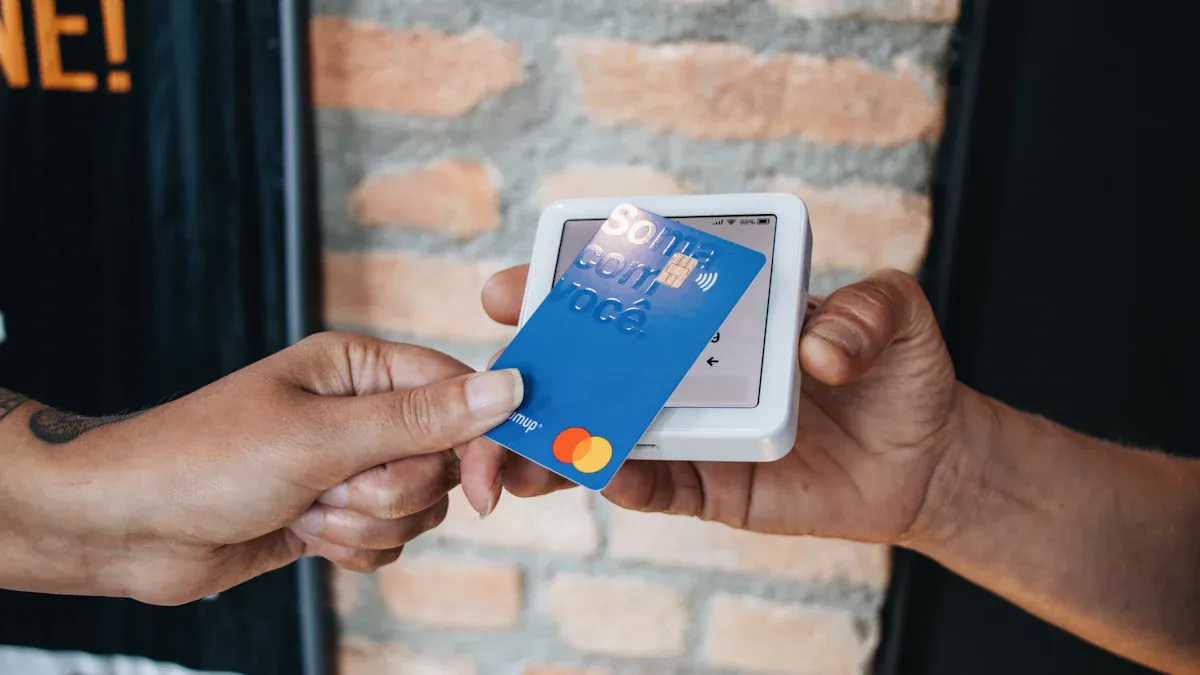
You want to share your contact info fast. Dot business cards make this easy with NFC and QR code. Tap your card to a phone or let someone scan your code. NFC works in seconds, even without internet. QR codes are simple for anyone with a smartphone. Both ways help you share info right away.
- NFC lets you send your info with a tap. You do not need to open any apps.
- QR codes work for everyone. Show your code, and they scan it with their camera.
- NFC can work offline, so you do not worry about losing your connection.
- QR codes might need internet, but they work well at most events.
You can use both ways to meet more people at events. This helps you grow your network and reach more people. Digital business cards give you more ways to connect than paper cards. You can change your info anytime, so you never miss a chance to meet someone new.
| Feature | Digital Business Cards | Paper Business Cards |
|---|---|---|
| Personalization | You can add photos, videos, and links | Only printed design |
| Information Sharing | Share by NFC, QR code, or link | Only by giving out the card |
| Update Flexibility | Change info anytime, no reprints needed | Must reprint for every update |
| Environmental Impact | Eco-friendly, no paper waste | Uses paper, not good for the planet |
Digital business cards let you share more and do more. You can send your card in many ways, which makes meeting people easier. You also help the planet by using less paper.
Using Them at Networking Events
You want to stand out at networking events. Using them at events means you can share your info fast and keep talking. Start with a friendly hello and talk about things you both like. When it feels right, give your card. Ask for their card too. This shows you care and helps you make good connections.
Here are some tips to help you meet more people at events:
- Give your card at the right time, not right away.
- After you trade cards, send a quick message to follow up.
- Keep your cards ready and easy to grab.
- At conferences, share your card after you speak or put your QR code on your slides.
- At trade shows, show a big QR code at your booth and teach your team to share cards fast.
- At small meetups, focus on good talks and use detailed cards.
Virtual events are also good for meeting people. Digital business cards are easy to share in chat or on screen. You can add links, videos, and your company logo to make your card stand out. This helps you meet more people even if you cannot be there in person.
| Strategy | Description |
|---|---|
| Convenience | Share your card easily during online events. |
| Interactivity | Add links and videos to keep people interested. |
| Eco-friendly | No paper needed, so you help the planet. |
Add a nice photo and your company logo. This helps people trust you and remember you. When you use dot business cards, you make meeting people easy at all kinds of events.
Make a Lasting Impression
First impressions are important. People notice your card right away. The look of your dot card can change how people see you. Use colors that match your brand. Blue can mean trust, and red can mean energy. Pick a font that is easy to read. Leave space around your info so it does not look crowded.
- Use clear images and your logo.
- Pick a special shape or rounded corners to stand out.
- Make sure your card is easy to read and not too busy.
- Add links or videos to keep people interested.
When you give your card, smile and look at the person. This helps you make good connections. Your card should show your style and brand. The right design and technology help you meet more people and make every meeting count.
Tip: Always keep your info up to date. This shows you care about your contacts and want to build strong relationships.
Dot business cards help you meet more people and make a good impression at every event. You can change your info anytime, so your network always has your latest details.
Manage Digital Business Cards
Update Your Information
You want your digital business cards to stay always up-to-date. With dot business cards, you can update your contact information from your phone or computer. This means you never have to worry about giving out old details. If you work in different roles, you can manage more than one card. You might have one card for your main job and another for freelance work. You can switch between them fast. This helps you share the right info with the right people and keep your network organized.
Tip: A well-crafted digital business card lets you show your best self in every situation.
Track Interactions
Tracking your connections is easy with digital business cards. You can see who views your card and when they do it. This helps you know who is interested in your work. You can follow up with people who scan your card. This makes your networking stronger. You can also keep notes about each meeting. This way, you remember what you talked about and plan your next steps.
- See who scans your card.
- Follow up with new contacts.
- Keep notes about your meetings.
Use Analytics
Digital business cards give you smart tools to measure your networking. You can see how many people view your card, where they find it, and which links they click. This data helps you improve your strategy and reach more people in your network.
| Metric | Description |
|---|---|
| Views or number of scans | Tracks how many people are seeing your card, showing reach and interest. |
| Traffic sources | Shows where visitors come from, so you know which channels work best. |
| Scans by location | Tells you where people scan your card, helping spot trends. |
| Referrer data | Finds out which platforms send people to your card. |
| Clicks on specific links | Shows which links get the most attention. |
| Saves or business card downloads | Lets you see who wants to connect after meeting you. |
You can use this information to see what works. Try new ideas and see how people respond. Change your approach based on what your contacts like. This makes your networking smarter and helps you build better connections.
- Check how people use your card.
- Change your message to match what works.
- Grow your network with better technology.
Digital business cards also save you money. You pay once and use your card as much as you want. There are no monthly fees. Over a year, you can save a lot compared to paper cards.
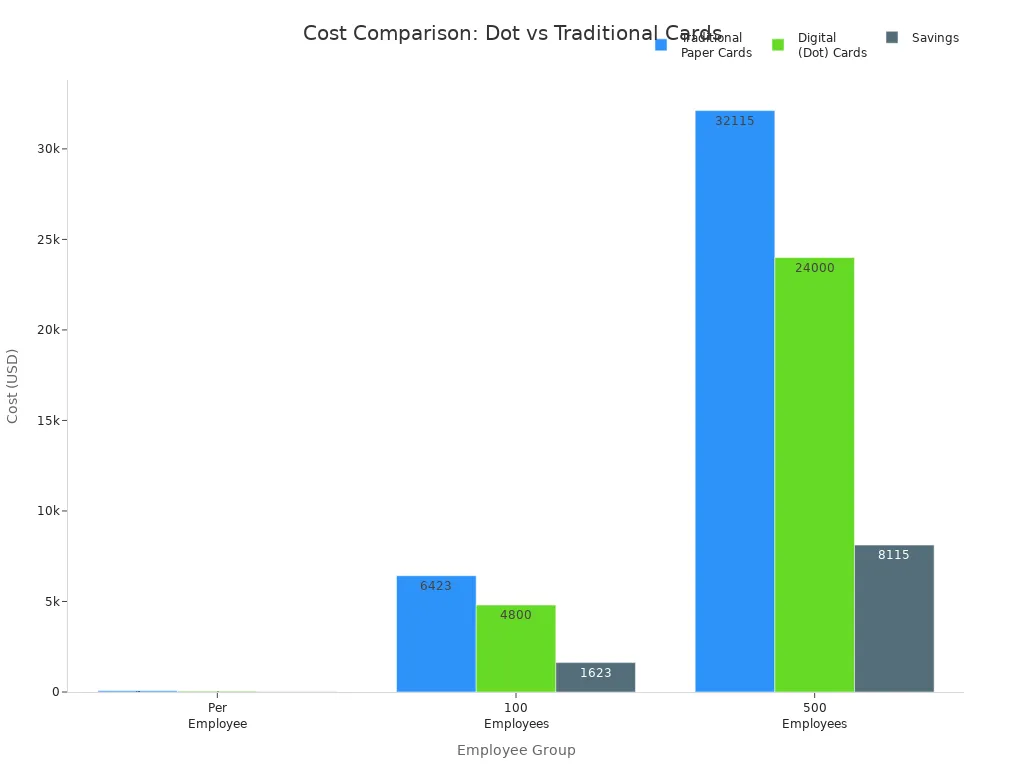
You get a cost-effective tool that helps you connect, track, and grow your network—all with the latest technology.
You can set up, share, and manage your dot business cards in just a few minutes. This simple process helps you connect with more people and keeps your networking strong. Professionals love these cards because they are easy to share, always up to date, and help you make better follow-ups.
| Feature | Benefit |
|---|---|
| Real-time updates | Your contacts always get the right info. |
| Analytics | See who views your card and follow up with them. |
| Continuous refinement | Improve your networking by learning what works best. |
- Connect with people anywhere in the world.
- Share your card quickly and securely.
- Keep your contacts organized and easy to find.
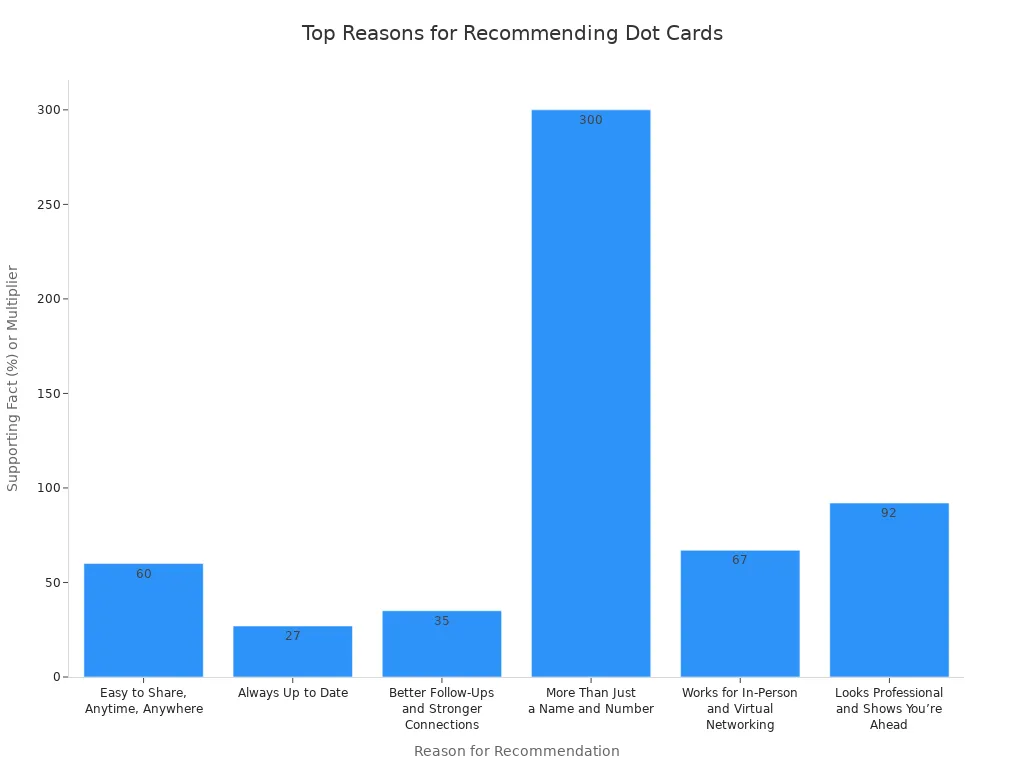
Stay ahead in 2025. Keep your digital business cards updated and watch your network grow.
FAQ
How do I update my Dot business card information?
You can update your info anytime. Just log in on your phone or computer. Tap “Edit Profile” and change your details. Your card updates right away.
Can I use Dot business cards without an app?
Yes! You do not need an app to share your card. Tap your card or show your QR code. The other person can open your info in their browser.
What if someone’s phone does not support NFC?
No worries! Show your QR code instead. Most smartphones can scan QR codes with the camera. You always have a backup way to share your info.
Are Dot business cards safe to use?
Dot business cards use secure links. You control what info you share. You can update or hide details anytime. Your privacy stays protected.
Can I have more than one Dot business card?
- Yes, you can create multiple cards.
- Use one for work and another for personal contacts.
- Switch between them easily in your profile.


