


Now, your business card isn’t just a piece of paper — it’s a bridge between offline introductions and your online presence. Whether you’re a freelancer, a small business owner, a designer, or a creator, people want to connect fast. And with Instagram acting as a digital portfolio for behind-the-scenes content, reviews, and brand personality, it has become one of the most important social media platforms to include on a business card.
But here’s the catch: Many people still confuse the Instagram handle with the Instagram username or display name, and printing the wrong one means potential customers might not find your landing page at all. Let’s make it simple — and help you display Instagram information in a professional, modern, and effective way.
What’s the Difference Between an Instagram Handle and Username?
Before you print Instagram on your business card, you need to know the difference. It affects how easily people can search your profile, follow your brand, and access your content.
What it means
Your Instagram handle is your unique identity on the platform — the @name people type to find your account. Example: @luna.bakery.studio
Think of it as your direct line to your Instagram account. When printed on a business card, the handle instantly tells potential clients where to find you. No long links. No confusion. Just a scan or one quick search.
A clean, visible handle helps:
- Direct people straight to your Instagram profile
- Encourage them to view your brand and services
- Showcase social proof like reviews and community engagement
- Turn offline connections into online followers and customers
Instagram Display Name vs Instagram Username
Display Name is the bold name at the top of your profile.
Username / Handle is the @name people search.
| Type | Example | Can change anytime? | Used to search you? |
|---|---|---|---|
| Display Name | “Luna Bakery” | ✅ Yes | ❌ No |
| Instagram Handle (@username) | @luna.bakery.studio | ✅ Yes but rare | ✅ Yes |
Your Display name helps express who you are — but the handle helps people find you.
When someone meets you, they’re not going to scroll through usernames hoping to guess yours. They want a clear sign to connect.
That’s why, when printing Instagram information, the @handle wins almost every time.
Why people confuse social media handles
People mix these terms because:
- They appear next to each other in the Instagram app
- Many brands use stylized names that look similar
- Other social media information terms vary across platforms (Facebook uses names differently)
- Most people never think about the difference — until they need to display Instagram on physical materials like business cards or signage
A simple rule: Display name = brand label Instagram handle = your unique social media handle people search and click. And when you put Instagram on your business card, clarity matters more than creativity — you want people to find you in seconds.
Which Instagram Info Should You Put on Business Cards?
Printing Instagram on your business card shouldn’t feel complicated. The goal is simple: help people find you quickly and remember your brand. In a world where potential clients look you up online before sending a message or booking a service, your business card needs to connect the offline and digital worlds smoothly. That means using the clearest and most searchable Instagram identifier.
Below, you’ll learn exactly what to print — and when each option makes sense.
Best Option: Instagram handle for business cards (@… format)
The Instagram handle (@username) is the standard for business cards. It’s short, recognizable, and instantly tells people how to search for you on the platform.
Why it works best:
- People can search it in seconds
- Consistent with other social media platforms (TikTok, X, etc.)
- Looks clean with social media icons
- Works for both print and digital business cards (NFC, QR codes)
Example formats you commonly see:
- @moon.studio.design
- @healthyplates_co
- Instagram icon + @wildflowerbeautybar
This format helps customers quickly find your profile and browse your services, behind-the-scenes content, and style — all without typing a long Instagram URL.
If you only print one Instagram element, make it your @handle.
When to include your display name + handle for digital presence
In some cases, you may want to include both your display name AND your handle, especially if your name and username don’t perfectly match.
Choose both if:
- You run a personal brand (coach, photographer, freelancer, instructor)
- You have a brand name + personal identity tied together(e.g., @sarahcreates for “Sarah Chen Studio”)
- Your handle includes numbers or characters for availability(e.g., @beautybyjane_99)
This gives people two ways to remember you: your identity and your search handle — boosting recall and search success.
Simple rule to decide which social media handle to print
Here’s the easy formula:
If people search your brand → Print your @handle only. If they search your name → Print both name + @handle.
This rule works across most social media profiles and platforms. (including facebook, instagram and other networking websites)
The clearer your contact details are, the better the results.
Your business card doesn’t have to include every social media handle you own. Focus on the platform where you are:
- Most active
- Most searchable
- Best represented visually
For many businesses today — especially creatives, boutiques, beauty professionals, gyms, cafés, and small businesses — that’s Instagram.
How to Add an Instagram Handle to a Business Card

Adding your Instagram handle to a business card involves more than just printing your @username. The key is to ensure it is visible, easy to scan, and instantly recognizable so potential customers can connect with you quickly.
Whether you’re creating a physical or digital business card, this step plays a crucial role in how effectively people discover your Instagram profile and explore your offerings, whether services, products, or creative work.
Here are clear and professional ways to incorporate Instagram details that suit modern networking.
Where to display Instagram handle on business card design
Placement affects readability and visual hierarchy. Keep your Instagram information close to your other contact details so a person sees it naturally.
Common, effective placements:
- Bottom left or bottom right corner
- Back of the business card (clean and minimal look)
- Under your contact details (email, phone, website)
- Social media icons row near brand logo or name
For digital or NFC business cards:
- Add your IG handle under your main links
- Include an Instagram QR code and icon
- Place social media icons stacked, not scattered
The objective is clarity: people should immediately recognize where to find you online.
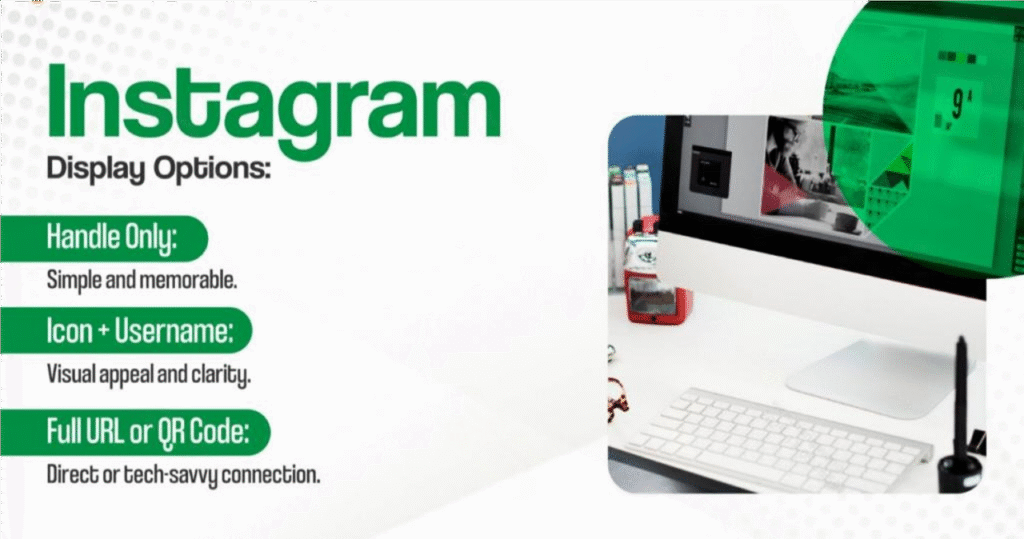
Ways to display Instagram: instagram icon, @handle, QR code, URL
There are multiple ways to display Instagram on a business card. Choose one that fits your visual style and business card design.
1) Instagram icon + @handle
Clean, modern, instantly recognizable.
2) @handle only
Minimal and stylish, ideal for creative brands.
3) Text label for clarity (great for older audiences or corporate cards)
4) QR code + @handle (fastest user action — one scan)
5) Full Instagram URL (only if you must — not recommended)
Most brands avoid printing the full Instagram URL because it’s long, breaks the design, and adds visual noise.
The cleaner the layout, the easier it is for someone to go from business card → Instagram profile.
Design elements: brand colors, visible hierarchy, readability
A polished business card keeps Instagram information clear, balanced, and easy to spot at a glance.
Key design guidelines:
- Use your brand colors consistently
- Make the Instagram icon clean and modern (flat icon, not gradient blob)
- Follow a visible hierarchy: name > role > contact > socials
- Give icons & text breathing space — avoid crowding
- Keep font size readable in print (not tiny just to “fit more”)
- Use a monochrome Instagram icon if your background is colorful
- Avoid excessive icons — focus on the platforms that matter
- Test QR codes to make sure they’re scannable before printing
Digital presence is part of your brand. A thoughtful design helps your Instagram handle stand out without overwhelming other contact information.
Best Practices for Social Media Icons & Displaying Instagram Profile
Including Instagram on your business card is not just about printing @handle — it’s about presenting your digital presence clearly, cleanly, and confidently. A well-designed social media presence helps potential clients find your work, see your style, and build trust before they contact you.
Here are the practices that make social media business cards look professional and modern.
Do’s for instagram logo + social media icons
- Use the official Instagram icon (flat, clean version)
- Keep icons the same size and style across platforms (Instagram, Facebook, networking website)
- Use brand colors or neutral colors for consistency
- Place Instagram info near contact information so it feels like part of the essential elements
- Use clear spacing and alignment for a balanced layout
- Add a QR code linking directly to your landing page if you want one-scan access
- Keep text simple: Instagram icon @username
- Make sure your Instagram account is active, professional, and updated anytime
- Ensure your profile picture, bio, services, and highlights are ready before sharing
When done well, Instagram becomes a powerful tool to showcase work, behind the scenes content, customer reviews, and real examples of your services.
Don’ts: too many icons, tiny text, cluttered background
- Don’t overload your business card with excessive icons (2–3 max)
- Avoid tiny Instagram icons that look blurry when printed
- Avoid printing a long instagram URL if you have @handle or QR codes available
- Don’t place Instagram text on a busy background or patterned image
- Avoid outdated gradient logo styles that clash with modern business card design
- Don’t use mismatched icons or different icon shapes
- Avoid squeezing social profiles in just to “have everything”
- Don’t treat Instagram as an afterthought — inconsistent placement looks unprofessional
Social handles should look purposeful — not like they were pasted in last minute.
When someone sees your business card, they should immediately recognize your Instagram information and know exactly where to click, scan, or search.
Which Instagram Information Should You Put on a Business Card?
When adding Instagram to a business card, clarity matters more than decoration. The goal is to help people find you instantly — not make them guess.
The Instagram details you can put:
| Element | Use Case | Example |
|---|---|---|
| Instagram handle (@username) | Best + most universal | @xxxstudio |
| Instagram icon only + @handle | Clean, modern, space-saving | 📷 @xxxstudio |
| QR code linking to profile | Fastest to connect, best for events | QR code → Instagram |
| Instagram URL (optional) | Traditional / corporate business cards | instagram.com/xxxstudio |
Quick Checklist Before Printing Business Cards
Before you send your business card to print, use this checklist to make sure your Instagram information and social media elements are polished, clear, and professional. A great business card not only looks good — it connects people to your profiles without confusion or friction.
Instagram Information
- Your @instagram handle is correct, readable, and current
- No extra spaces or typos (e.g., @brand.studio, not @ brand . studio)
- Optional: Instagram icon placed before handle for clarity
- If using QR code, it links directly to your Instagram profile (test it!)
- If including multiple social profiles, Instagram stays first or most prominent
Visual Design & Layout
- Handle is large enough to read (avoid tiny text)
- Good visual hierarchy — name > role > socials
- Consistent design elements: brand colors, fonts, style
- Enough white space — not cluttered, not too many social media icons
- Social media icons sized consistently
- Instagram logo used correctly (no stretched, warped, recolored beyond brand rules)
Brand & Personal Image
- Your profile picture on Instagram matches your business identity
- Your Instagram feed has recent posts (looks active)
- Highlights or pinned content reflects what you do
- Bio clearly communicates your services or niche
A business card drives people to your page — make sure it’s ready when they arrive.
Print Quality Details
- High-resolution file (300 DPI)
- Safe margin and bleed set correctly
- Colors print accurately
- QR code prints sharp and scannable at business-card scale
- Paper stock chosen (matte, textured, or premium works best for modern branding)
Final Quick Test
Ask yourself:
If a potential customer sees my business card for 5 seconds, can they spot my Instagram and understand what I do?
If the answer is yes — you’re ready to print.
If not, simplify, enlarge, or move your Instagram handle for better visibility.
FAQ: Social Media Profiles on Business Cards
1. Should I put my Instagram on my business card?
Yes — if Instagram helps showcase your work, builds trust, strengthen networking or attracts clients. For creators, small businesses, and other designers, Instagram is a powerful tool for social proof and visual storytelling. If your account isn’t active or relevant, skip it.
2. Should I print the Instagram icon or write “Instagram”?
Use the Instagram icon + @handle.
It saves space, looks modern, and people instantly recognize it.
Writing “Instagram:” feels dated and clutters your layout.
3. What if my Instagram handle changes later?
If you’re planning a rebrand, use a QR code instead of printing the handle directly — QR codes can be updated anytime through digital business card platforms. But if your handle is stable and part of your brand identity, printing @handle is best.
4. Should I include multiple social media handles?
Only if they add value.
One strong platform > four weak ones.
If Instagram is your main social profile, feature it — avoid excessive social media icons that distract. Add others only if you actively use them and they support your brand (like LinkedIn for professionals or TikTok for creators).
Conclusion
A modern business card isn’t just a piece of paper — it’s a bridge between your physical networking and your digital presence. When someone takes your business card, you want them to instantly find your work, your personality, and your brand story online. Your Instagram handle plays a big role here, especially if your business relies on visuals, behind-the-scenes content, or trust-building social proof.
So here’s the simple takeaway:
- Use your Instagram handle (@username) — it’s recognizable and easy to search.
- Add your display name only if it helps people identify you.
- Keep design clean: strong visible hierarchy, clear fonts, and a simple Instagram icon.
- Consider a QR code for instant access and flexibility.
- Make every element earn space — business card should guide people, not overwhelm them.
A thoughtful, well-designed business card with your Instagram page can grab attention, leave a lasting impression, and create a direct line between meeting someone offline and connecting with them online.
Now, you’ve got the knowledge to easily create a professional, modern business card that actually drives followers, leads, and customers. Go build business card that works as hard as you do.


